
Introduction
The “Upload Failed avrdude stk500 getsync() attempt X of 10” error is a common yet frustrating issue that Arduino users encounter, especially after reinstalling Windows 10. This error typically occurs when the Arduino IDE fails to synchronize with the microcontroller on your Arduino Nano, preventing code uploads. If you’ve recently formatted your laptop and reinstalled Windows 10, only to face this error, don’t worry—this guide will walk you through the steps to resolve it. By the end of this blog, you’ll understand why this error happens, how to fix it, and how to prevent it in the future.
Table of Contents
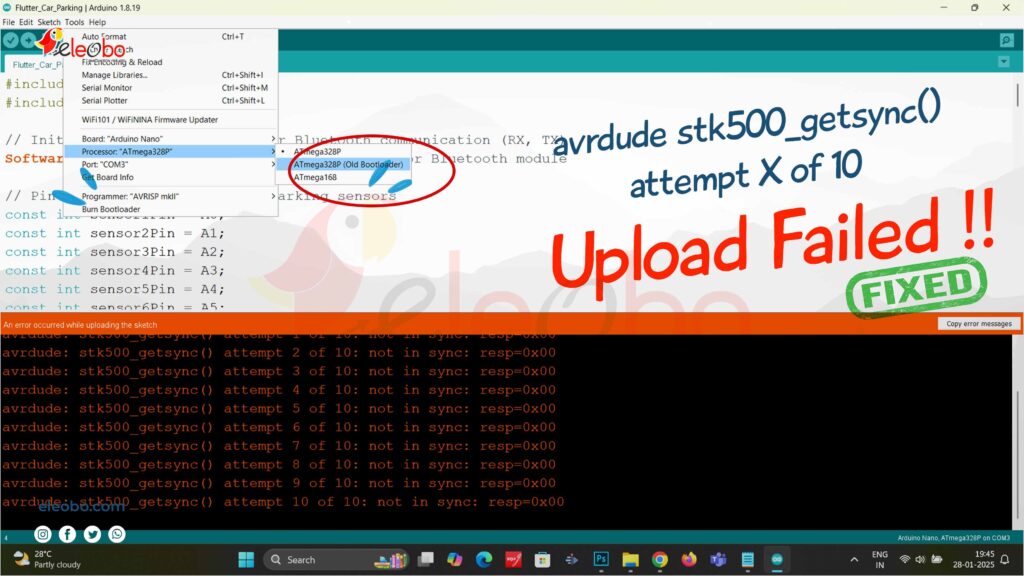
What Causes the ‘Upload Failed avrdude stk500 getsync() attempt X of 10’ Error?
The “Upload Failed avrdude stk500 getsync() attempt X of 10” error is often caused by communication issues between your computer and the Arduino Nano. Here are the most common reasons
- Incorrect Bootloader Settings
Newer versions of the Arduino IDE default to the new bootloader for certain boards, including the Arduino Nano. However, many older Nano boards require the old bootloader to function correctly. - Driver Issues
Reinstalling Windows 10 can lead to missing or outdated drivers, which are essential for your computer to recognize the Arduino Nano. - Port Configuration Problems
After reinstalling Windows, the COM port assignments may change. If the Arduino IDE isn’t configured to use the correct port, uploads will fail. - Faulty USB Cable or Connection
A damaged USB cable or loose connection can interrupt communication between your computer and the Arduino Nano. - IDE Version Compatibility
The version of the Arduino IDE you’re using may not be fully compatible with your Arduino Nano or the drivers installed on your system.
How to Fix the ‘Upload Failed: avrdude stk500 getsync() attempt X of 10’ Error
If you’re facing this error after reinstalling Windows 10, follow these steps to resolve it:
1: Select the Old Bootloader in Arduino IDE
- Open the Arduino IDE.
- Go to the “Tools” menu, hover over “Board,” and select “Arduino Nano.”
- Hover over “Processor” and select “ATmega328P (Old Bootloader).”
- Ensure that the correct COM port is selected under the “Port” option in the “Tools” menu.
- Try uploading your code again.
2: Reinstall the Arduino IDE
If selecting the old bootloader doesn’t work, try reinstalling the Arduino IDE:
- Uninstall the Arduino IDE completely.
- Download the latest version from the official Arduino website.
- Reinstall the IDE and try uploading your code again.
3: Update or Reinstall Drivers
- Visit the Arduino website and download the latest drivers for your Arduino Nano.
- Follow the installation instructions carefully.
- Restart your computer and try uploading your code again.
4: Check USB Cable and Port
- Use a high-quality USB cable and try connecting the Arduino Nano to a different USB port on your computer.
- Ensure that the connection is secure.
5: Verify IDE Settings
Why the Old Bootloader Works
Double-check all settings in the Arduino IDE, including board selection, processor, and port.
The old bootloader is often the solution for Arduino Nano upload errors because it’s compatible with older versions of the board. Newer bootloaders are optimized for updated hardware, but they may not work seamlessly with older models. By selecting the old bootloader, you ensure that the IDE communicates effectively with your Arduino Nano, allowing for successful code upload
Preventative Measures to Avoid Future Upload Errors
To minimize the chances of encountering the “Upload Failed avrdude stk500 getsync() attempt X of 10” error in the future, follow these best practices:
- Always Double-Check Bootloader Settings
Ensure that the correct bootloader is selected in the Arduino IDE before uploading code. - Keep Drivers Updated
Regularly check for driver updates on the Arduino website and install them as needed. - Use High-Quality USB Cables
Invest in durable USB cables to avoid connection issues. - Verify Port Configuration
Always confirm that the correct COM port is selected in the Arduino IDE. - Test with Another Arduino Board
If you have access to another Arduino Nano or compatible board, test it to determine whether the issue is hardware-related.
Conclusion
The “Upload Failed avrdude stk500 getsync() attempt X of 10” error can be frustrating, but it’s often easy to fix. By selecting the old bootloader in the Arduino IDE, updating drivers, and ensuring proper port configuration, you can resolve this issue and get back to your projects. Remember, patience and attention to detail are key when troubleshooting Arduino problems
Download BlueBot Controller App and start your journey today!